Android Security: The Falcon’s Guide to Permissions & Attack Surfaces
Target
Android App Security
Goal
Understanding the Attack Surface
When we audit an Android application, we aren’t just looking at code; we are looking at a fortress. As a pentester, your job is to find the doors left unlocked, or the windows that have a weak latch.
Today, we break down the most fundamental concepts of Android security: Exported Components and Permissions.
𖤍 The Open Door: exported="true"
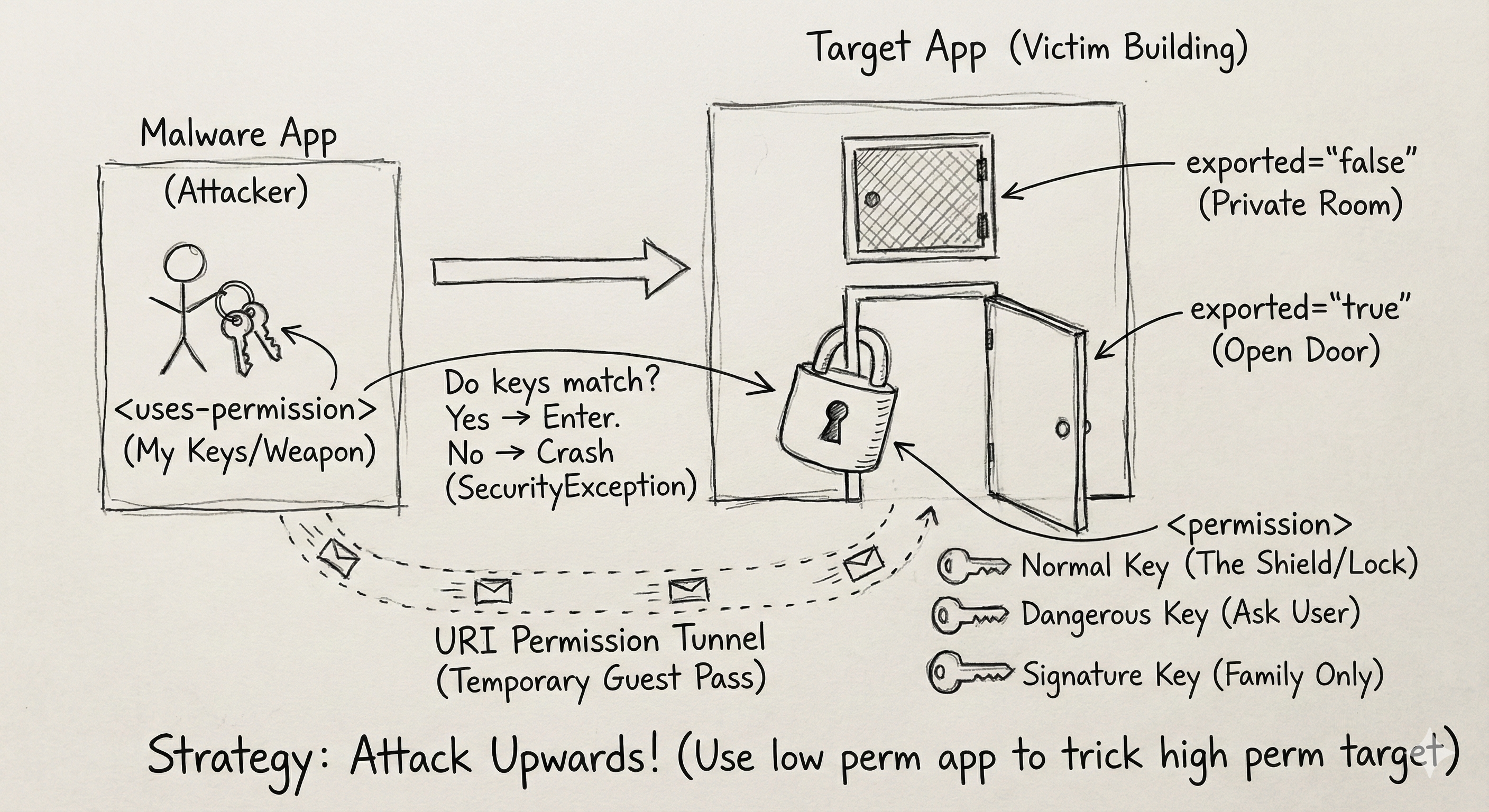
Think of an Android app like an office building. Inside, there are many rooms — Activities, Services, and Receivers.
exported="false": These are internal storage rooms. Only employees (components of the same app) can enter. These are safe zones.exported="true": This is the reception area. The door is open to the public street. Any other app on the device can walk in and say “Hello.”
𓆲 Falcon Recon
Your first step is finding every component with exported="true". If the door is open, we can try to walk in.
𓅓 The Guardian: Permissions
Just because the door is open (exported="true") doesn’t mean you can do whatever you want. There might be a guardian — the Android system — checking ID cards.
These ID cards are Permissions.
𓅂 The Levels of Access
- Normal Permissions: The “Visitor Badge.” Low risk (e.g., Internet access). Granted automatically by the system.
- Dangerous Permissions: The “VIP Pass.” High risk (e.g., Camera, Location, Contacts). Requires user confirmation.
- Signature Level: The “Owner Access.” Only apps signed with the same private key as the target app can enter. Usually a dead end for external attacks.
𓅉 The Trap: uses-permission vs permission
Do not get confused by the AndroidManifest.xml. There’s a huge difference:
<uses-permission>: The weapons the app has (e.g., “I can read SMS”).<permission>: The shield the app uses (e.g., “You need a specific key to talk to me”).
𓅆 Code Analysis
Imagine you’re auditing a banking app with the following manifest entry:
1
2
3
4
<service android:name=".MoneyTransferService"
         android:exported="true"
         android:permission="com.bank.custom.TRANSFER_FUNDS">
</service>
Vulnerability Analysis
- Is it exported? Yes — visible to other apps.
- Can we touch it? Not yet — it’s protected by a custom permission (
TRANSFER_FUNDS).
🐦🔥 The Exploit
To attack this, your malicious app could declare:
1
<uses-permission android:name="com.bank.custom.TRANSFER_FUNDS" />
If the protection level for TRANSFER_FUNDS is Normal or Dangerous, you might trick the user into granting it — gaining unintended access.
𓅈 The Secret Tunnel: URI Permissions
Sometimes, an app is locked down tight (exported="false"), but the developer needs to share a single file (e.g., sharing an image to Instagram).
They use URI Permissions, specifically FLAG_GRANT_READ_URI_PERMISSION.
Think of this like a temporary guest pass — it bypasses locks and ignores exported rules.
⚠️ Danger: If the developer grants this access loosely (for example, using a FileProvider), a malicious app could “ride along” on that permission. This can expose sensitive files such as internal databases or private photos.
Always check for GrantUriPermissions when auditing.
𓅇 Attack Strategy: “Attack Upwards”
Remember the golden rule: Privilege Escalation.
You don’t need to be the Admin — you just need to trick the Admin.
- Create a malware app with low or normal permissions.
- Find a vulnerable, exported component in a target app with higher privileges.
- Send a crafted malicious Intent to that component, tricking it into performing high-privilege actions on your behalf.
𓅃 Visual Summary
Happy hunting. 𓅂