Your npm Checklist Has a Blind Spot: Malware That Never Touches Install Scripts
𓂀 Okay so what’s the standard npm advice?
Let’s be honest: if you’ve read anything about npm supply-chain attacks, you’ve seen the same first tip.
“Turn off install scripts.” npm config set ignore-scripts true, done. The reasoning is solid: most npm malware used to run in a postinstall hook, so no hooks, no malware.
That advice is good. It is also now not enough.
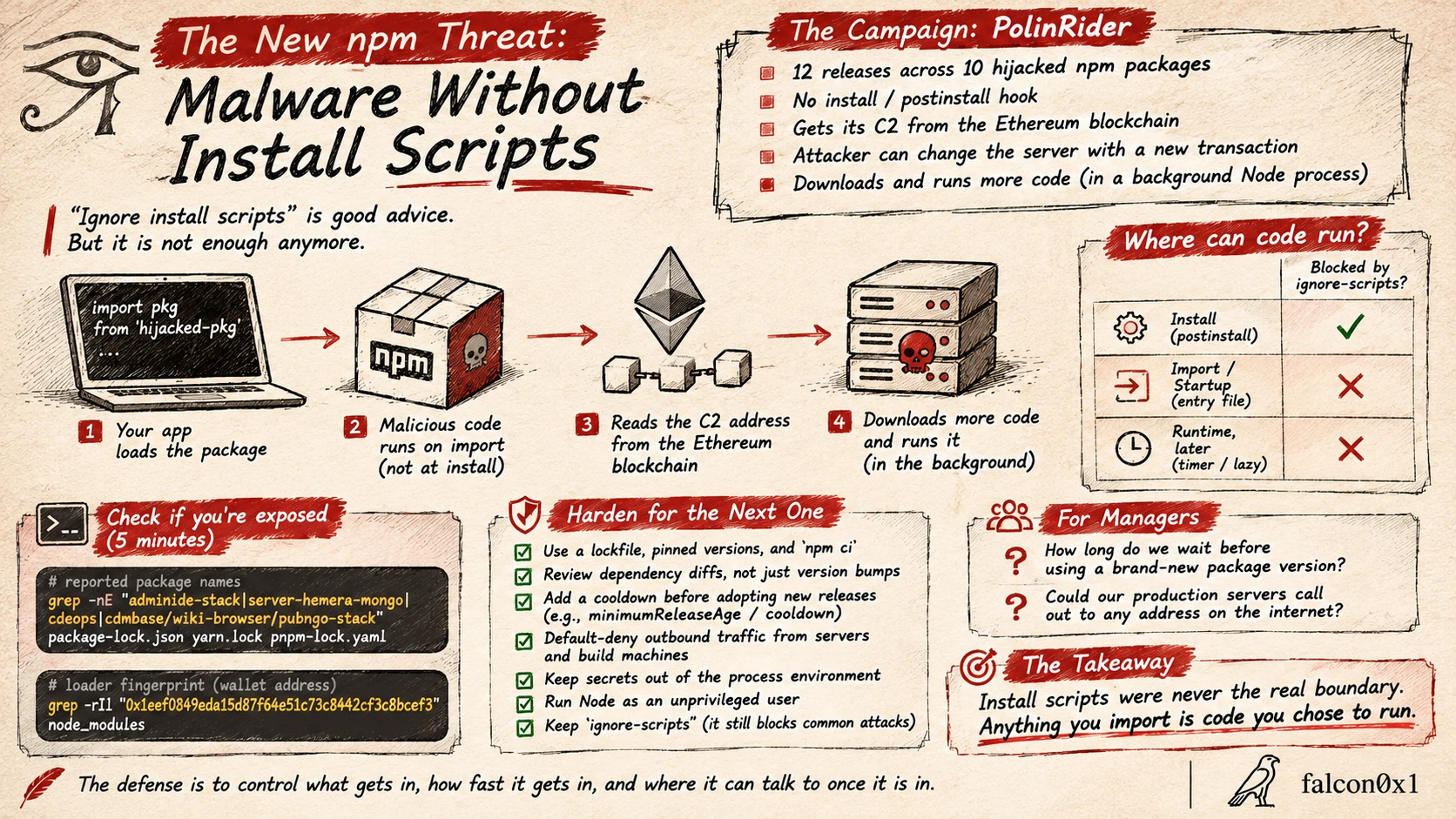
This week a campaign got attention for doing the opposite. The hijacked packages have no install hooks at all. Nothing runs at npm install. The malicious code waits until your application loads the package.
𓅃 What was reported
Researchers at Sonatype and OX Security (and others) described a loader, tracked as PolinRider, that was found inside 12 releases across 10 hijacked npm packages. The facts that matter for defenders:
- No consumer install or postinstall hook. The code sits inside the package’s normal entry file and runs when that file is imported, or when a bundled service starts.
- The loader asks the Ethereum blockchain where to go. It queries public Ethereum RPC endpoints (with a fallback explorer) for transactions tied to one wallet, and reads the server address out of the transaction data. The blockchain holds only the address, not the malware.
- The attacker can move. To change the command server, they send a new transaction. They never have to touch the npm package again, and there is no single domain to put on a blocklist.
- Then it downloads more code from that server and runs it, including in a detached background Node process.
The package names in this case were small and obscure (a few thousand weekly downloads combined). That is the point: you do not need a famous package to get a foothold, you need one that ends up in someone’s dependency tree.
Sources: OX Security, Sonatype, GBHackers.
𓅃 The mental model: where can code run?
Stop thinking “install time vs. never”. A dependency can execute in three places:
| Moment | Example | Does ignore-scripts stop it? |
|---|---|---|
| Install | postinstall hook | Yes |
| Import / startup | code in the entry file, runs when you require() it | No |
| Runtime, later | a timer or lazy function that fires after a delay | No |
ignore-scripts closes the first row only. The campaign above lives in the second.
𓂀 Step 1: check whether you’re exposed (5 minutes)
First, are any of the reported packages in your tree? From a project root:
1
2
3
# any of the reported package names in your lockfile?
grep -nE "adminide-stack|server-hemera-mongo|cdeops|cdmbase/wiki-browser|pubngo-stack" \
  package-lock.json yarn.lock pnpm-lock.yaml 2>/dev/null
No output means none of those names are in the file. Run it across every repo and every build image, not just your laptop.
Second, look for the loader’s fingerprints inside installed code (this is the wallet address reported in the write-ups):
1
grep -rIl "0x1eef0849eda15d87f64e51c73c8442cf3c8bcef3" node_modules 2>/dev/null
If either command finds something, don’t just delete the package. Removing it does not undo a compromise that already ran. Treat the host as exposed: isolate it, check for unexpected detached node processes and outbound connections, and rotate any credentials that machine could reach.
𓅃 Step 2: harden so the next one doesn’t need a headline
Names change every week, so don’t depend on a blocklist. Build the habit:
- Lockfile and pinned versions, installed with
npm ci.npm ciinstalls exactly what the lockfile says and fails if it doesn’t match.npm installcan quietly move versions. - Review dependency diffs, not just version bumps. A bump from
1.4.2to1.4.3can hide a new 40-line block in the entry file. Tools that show the diff between two published versions make this a two-minute job. - Add a cooldown before adopting new releases. Most hijacked releases are caught and pulled within days. Waiting a few days costs you almost nothing. Several tools support this directly (pnpm’s
minimumReleaseAge, Renovate’sminimumReleaseAge, Dependabot’scooldown), so check the option name in your own tooling. - Default-deny outbound traffic from servers and build machines. This loader had to call out to a server to do anything. If your production hosts can only reach what they need, the second stage has nowhere to go.
- Keep secrets out of the process environment where you can, and run Node as an unprivileged user. If code does run, there is less to steal.
- Keep
ignore-scripts. It still blocks the old, common attack. This post is “and also”, not “instead”.
𓂀 For the managers reading this
You don’t need to read a lockfile. Ask your team two questions:
- “How long do we wait before using a brand-new package version?” If the answer is “we don’t”, that is the gap.
- “Could our production servers call out to any address on the internet?” If yes, a single bad dependency has a free path home.
Neither takes a budget. Both turn a story like this into a non-event.
𓅃 The takeaway
Install scripts were never the real boundary. Anything you import is code you chose to run. The defense is to control what gets in, how fast it gets in, and where it can talk to once it is in.
𓅃 Stay curious, stay paranoid.