Your Data Was Safe Until It Met the Exporter
𓂀 Okay so what even is this one?
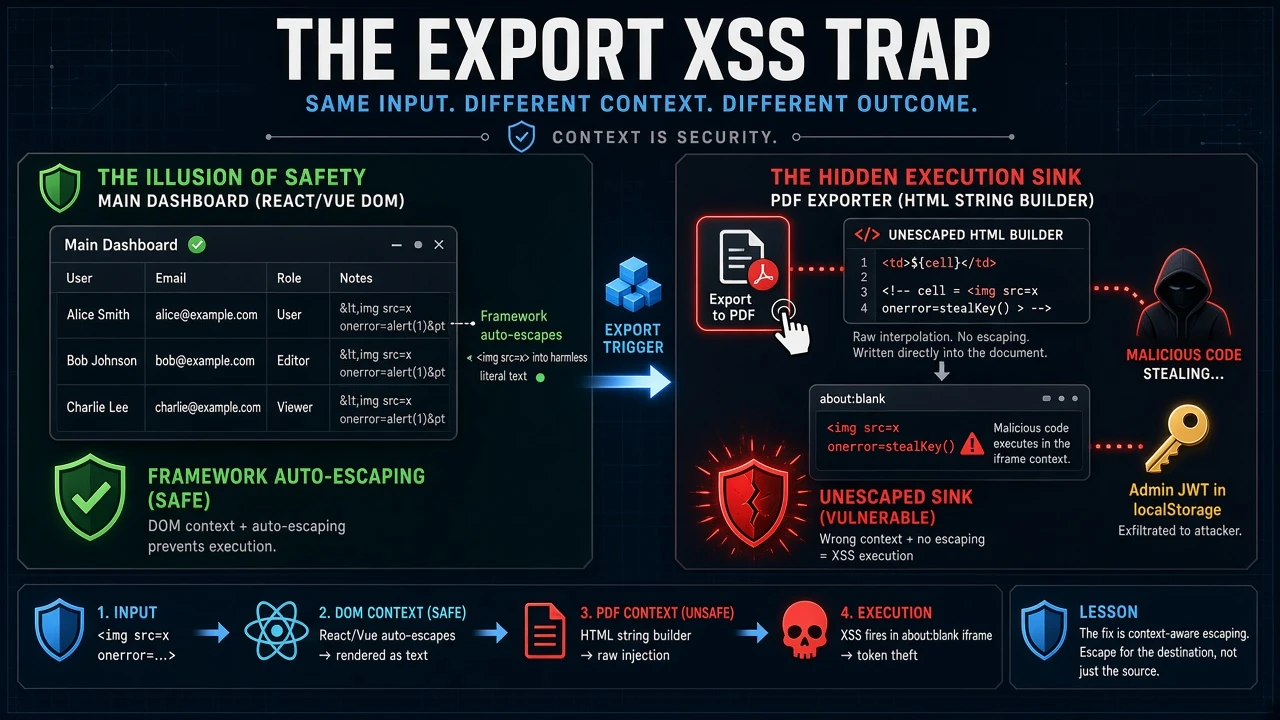
Picture this. You find a field that stores whatever you give it — <img src=x onerror=alert(1)>, raw, byte-for-byte, straight into the database. Classic stored-XSS setup. You get excited.
Then you go looking for where it renders… and it never fires. The list screen shows it as text. The detail screen shows it as text. You hook alert, you click around, nothing pops. The framework (React, Vue, whatever) is escaping it everywhere you look.
So you shrug, write it up as “stored raw, not exploitable,” and move on.
Don’t move on yet. You’ve only checked half the bug. The other half is hiding in a button most testers never click: Export.
The mental model: stored XSS has two halves
A stored-XSS finding is really two separate questions, and they can be answered weeks apart:
Half 1 — does untrusted input get stored raw? Half 2 — does any client ever turn that stored text back into HTML?
Half 1 is easy to prove. Half 2 is where people get lazy. They check the obvious screens, see the framework auto-escaping, and conclude “nothing renders it.”
But “the main screen escapes it” is not the same as “nothing renders it.” Modern frameworks auto-escape when they build the DOM. The moment some code builds an HTML string by hand, that protection is gone. And the places that build HTML by hand are exactly the ones you forget:
- PDF / print views
- CSV / spreadsheet exports
- Email / report templates
- tooltips, chart labels, “copy as HTML” helpers
Exports are the number-one blind spot, because an exporter’s whole job is to take your rows and re-serialize them into some other format’s markup.
𓅋 The sink I keep finding
Here’s the anti-pattern, generalized. An app has a shared “export to PDF” feature. Under the hood it does something like this:
1
2
3
4
5
6
7
8
9
10
11
12
13
// build an HTML table from the rows — no escaping anywhere
const html = `
  <table>
    ${rows.map(r => `<tr>${r.map(c => `<td>${c}</td>`).join("")}</tr>`).join("")}
  </table>`;

// drop it into a throwaway iframe and screenshot it to PDF
const iframe = document.createElement("iframe");
iframe.src = "about:blank";
document.body.appendChild(iframe);
const doc = iframe.contentDocument;
doc.open(); doc.write(html); doc.close();     // <-- here
await html2canvas(doc.body);                  // rasterize to an image -> PDF
Two things make this lethal:
<td>${c}</td>with zero escaping. Any cell that contains<img src=x onerror=...>becomes a real element the moment it’s parsed.- The iframe is
about:blank, which inherits the parent page’s origin. So the HTML you just wrote executes in the app’s own origin — with full access towindow.parent.localStorage, where the session token usually lives.
html2canvas is just a rasterizer. The browser parses and runs the HTML before it ever gets screenshotted. So the onerror fires at parse time, grabs the token, and does whatever it wants — all from clicking Export → PDF.
And here’s the kicker I see every single time: no Content-Security-Policy. A CSP that blocked inline event handlers would have turned this from “account takeover” into “nothing happened.” There almost never is one.
Side note: the Excel export on the same app is usually safe, because spreadsheet libraries write typed string cells — your formula or markup becomes inert text. It’s the PDF/HTML and CSV paths that bite. Check each format separately; don’t assume one verdict covers all three.
𓁹 How to find it (and prove it without logging in)
Finding it: pull the app’s JS bundle and grep the export code for the tells:
- template literals building
<td>,<tr>,<table>from data iframe+.contentDocument+document.write/.innerHTML =html2canvas/jsPDFfed raw HTML- and crucially: zero
DOMPurify/ escaping /textContenton that path
If the render code builds HTML from cells with no encoder in sight, you’ve found half 2.
Proving it — the nice trick: you often don’t even need to be logged in. Export logic is client-side. So in the console, import the real export module and feed it one malicious row:
1
2
3
4
5
6
7
8
const mod = await import("/assets/exportService-xxxx.js");
localStorage.setItem("demo_token", "SECRET-123");   // stand in for the real session token

await mod.exportToPdf(
  [{ name: `<img src=x onerror="parent.document.title='pwned:'+parent.localStorage.getItem('demo_token')">` }],
  [{ key: "name", label: "Name" }]
);
// tab title becomes "pwned:SECRET-123"  -> the cell executed and read the token
That’s the shipping code running, not a mock. The tab title flipping to your “stolen” token is about as clean a proof as you’ll get, and it needs no backend, no auth, no planting.
𓅊 The part that decides High vs Critical
A single unescaped exporter is bad. A shared exporter is worse, because it crosses trust boundaries. Ask two questions:
- Who can write into a cell?
- Who exports the list that cell lands in?
If a low-privileged user can plant a value (say, a name field via a bulk import) and a higher-privileged user later exports that list to PDF, then the low-priv user’s payload runs in the high-priv user’s origin. That’s not self-XSS — that’s “a random tenant steals an admin’s session by waiting for them to click Export.” The gap between the writer and the exporter is your blast radius.
If the only people who can write the cell are the same people who export it, it’s self-XSS and far less interesting. Map it before you pick a severity.
🛡 The fix (for the blue team reading this)
- Escape every cell before it touches an HTML string. Entity-encode, or build the table with
textContent/ DOM APIs instead ofdocument.write. One function, usually. - Ship a CSP. Even a basic one that kills inline handlers turns this class of bug into a non-event. It’s the backstop for every XSS you didn’t find.
- Validate on input too — but know the order of operations: an input validator only stops new bad data. Every malicious row already sitting in your database stays armed until the exporter is fixed. The output-side fix is the one that actually neutralizes what’s already stored.
𓅏 The one takeaway
When you find input that’s stored raw but “doesn’t render anywhere,” that’s not a dead end — that’s a to-do list. Go click Export. Go find the print view. Go read the email template. The framework guards the screens it builds; it does nothing for the code that builds HTML by hand, and that code is almost always in a feature nobody tests.
Stored XSS isn’t dead until you’ve checked where the data leaves the app, not just where it’s shown.
Keep watching the exits. 𓂀
𓅃 🪶